Valheim Server Hosting
Build a home for your crew, from the Meadows to the Deep North. Keep your Valheim world online so friends can join whenever they’re ready.
- PC
- Xbox
- PS5
- Switch 2
Installation starts after checkout. Once your world has loaded, share the join code from your dashboard. How setup works
Configure your server
Installation starts after checkout. Once your world has loaded, share the join code from your dashboard. How setup works
★★★★★
StokedNomad
berrybyte customer · 28 June 2024
Read on TrustpilotRead more reviews“They setup the server, got it live on Xbox, and my friends and I were able to play right away!!”
Valheim 1.0 server hosting for your crew.
Set sail for the Deep North with a dedicated Valheim server. Your longhouse, your ships and your next expedition stay ready whenever your friends want to play.

Play together, across platforms
Crossplay is enabled by default on vanilla servers. Friends on PC, Xbox, PS5 and Switch 2 can join the same world using the code in your dashboard.
Keep your longhouse. Or start a new story.
Bring your existing world with free migration help, or begin a fresh adventure. Back up before a major update; new terrain appears in areas your group hasn’t explored yet.
Choose your kind of adventure
Keep a vanilla world for a mixed PC and console group, or add BepInEx mods for your PC crew. Mods that players need to install won’t work on consoles.
Your world, without the busywork.
Share a join code, adjust your server, and keep a backup before the next expedition. It’s all in your browser.
One code. The whole crew.
Your join code appears when the world is ready. Friends open Join Game, choose Add server and enter the code. It changes after a restart, so the dashboard always has the one to share.
How friends join your world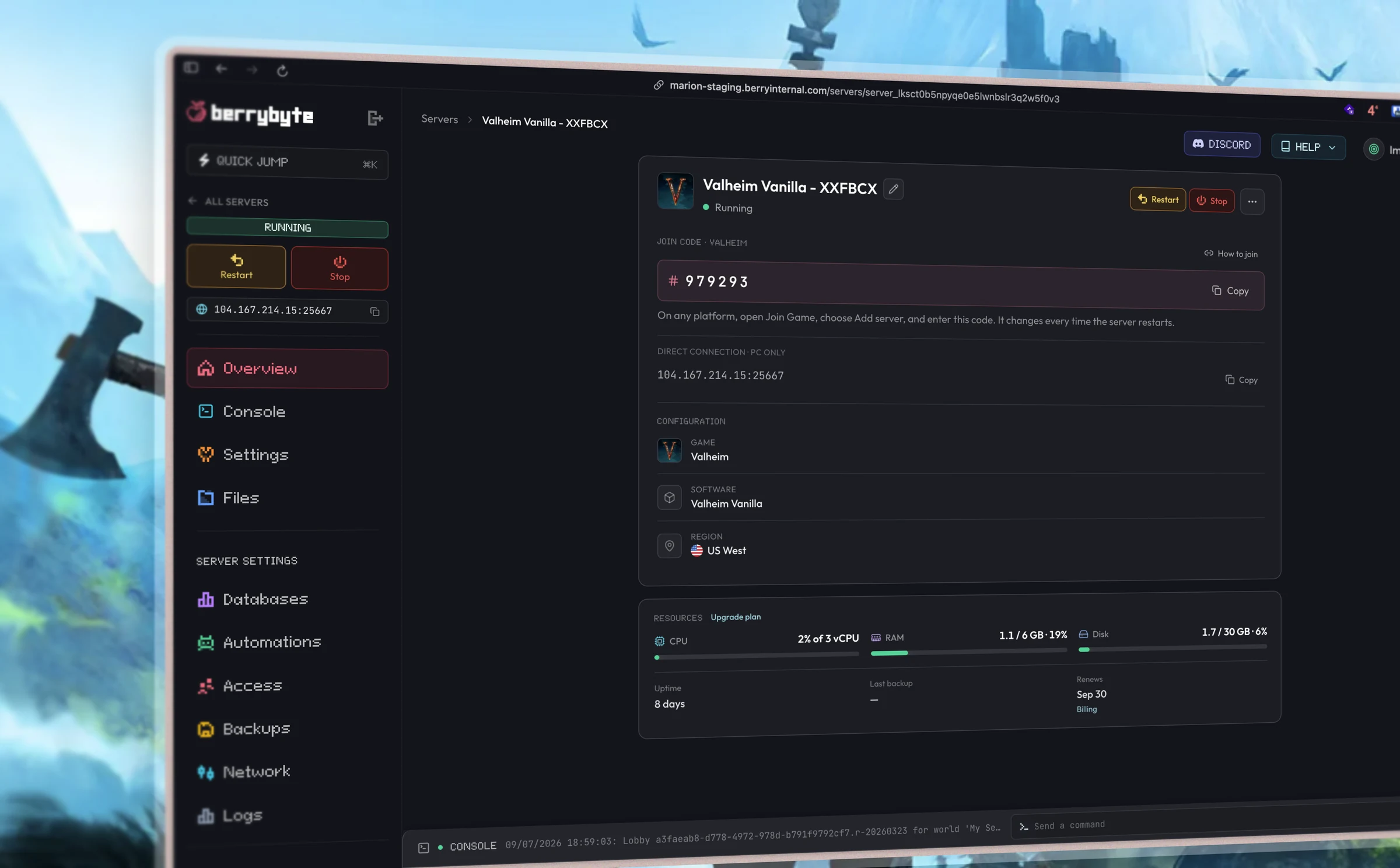
A little help with Valheim.
Start with a guide, or ask our team. Setup and migration help are included with your server.
How to Join a Valheim Server on PS5, Switch 2, Xbox and PC
Share the six-digit crossplay join code, and fix a code that has stopped working.
How to Upload, Migrate or Reset a Valheim World
Move a single-player save or another host's world with the matching .db and .fwl files.
Valheim 1.0 and Deep North: How to Update Your Server
Back up the .db and .fwl pair, take the new build, and decide whether to keep your world.
How Much RAM Does a Valheim Server Need?
Practical RAM sizing for vanilla groups, old worlds, and BepInEx mods.
Valheim server requirements
- RAM (vanilla group)
- 4 GB for a full 10-player group
- Players
- 1–10 (unchanged in Valheim 1.0)
- CPU
- High single-thread clock helps world saves
- Storage
- NVMe SSD
- Crossplay
- Enabled by default
- World backup
- Matching .db + .fwl files
Frequently asked questions.
Need help choosing? Talk to our team.
How much does Valheim server hosting cost?
Valheim server hosting starts at $9.95 USD per month. Your price depends on the player slots you choose. Setup help and automatic backups are included. You can see each plan’s monthly price in the selector above.
Does berrybyte support Valheim 1.0 and the Deep North?
Yes. Auto Update is enabled by default and installs the current dedicated-server build when your server starts. Your group should update their games to the same version before joining.
Can console players join my Valheim server?
Yes. Vanilla servers have crossplay enabled by default, so friends on PS5, Switch 2, Xbox and PC can join with the code shown in your dashboard. Share the new code after a server restart.
Can I move my single-player Valheim world to a server?
Yes. Upload the matching .db and .fwl world files, or ask our team for free migration help. Keep a backup of the original files. The world-transfer guide walks you through the move.
Do I need a new world for Valheim 1.0?
Existing saves continue to work. New Deep North terrain appears in areas no player has explored, so a fresh world can be a better choice if your group has already explored the north. Back up your existing world before updating.
How many players can join a Valheim server?
Valheim supports 1–10 players. Pick 4 slots for a small group, or the recommended 10-slot plan for the full party.
Can I use Valheim mods and crossplay together?
You can run compatible BepInEx mods on a PC server. Console players cannot install client-side mods, so use vanilla crossplay for a mixed group unless a mod explicitly supports unmodified clients. Our crossplay and modding guides explain the options.
How do backups work?
Automatic backups are included. You can also create a backup before adding mods or updating your world, then restore it from the dashboard. Our team can help if you’re unsure which save to use.
What if the server isn’t right for me?
New purchases include a 7-day money-back guarantee. Request a refund through support within 7 days of purchase. Read the refund policy. You can also cancel future renewals from your dashboard.