Valheim 1.0: Can't connect to server — every fix
Fix a Valheim 1.0 server connection in the right order. Check client and server versions, get the latest join code, enable crossplay, remove incompatible mods, validate the password, and clear an accidental permittedlist.txt allowlist.
If Valheim 1.0 says it failed to connect, work through these checks in order. Do not reinstall the world or delete server files first. The most common launch-day problem is simply that the client updated before the dedicated server.
Stop as soon as one fix works. If you are helping somebody else connect, test with one player before asking the whole group to retry.
1. Match the client and server versions
If you're getting this error:
Incompatible version
This server is running an older version of Valheim that is incompatible with your version.
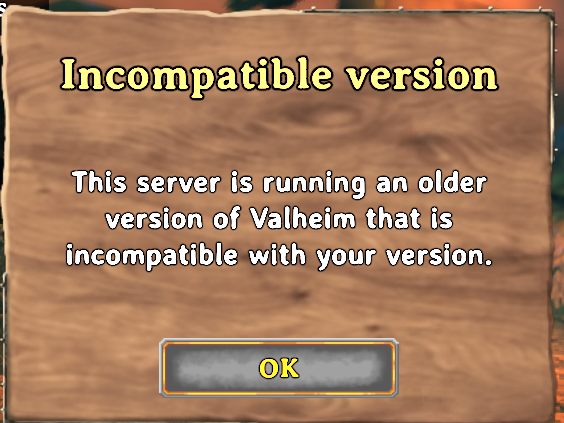
This is the number-one Valheim 1.0 launch-day issue. Steam, Xbox, PlayStation, and Switch can update the game before a self-hosted server takes the matching dedicated-server build. Valheim refuses the connection when the two versions differ.
Update the player's game
Close Valheim completely, install every available update from the platform store, and relaunch it. Do not leave an old game process suspended in the background.
Update the dedicated server
Stop the server cleanly. If you self-host through SteamCMD, run:
steamcmd +force_install_dir /path/to/valheim +login anonymous +app_update 896660 validate +quitStart the server and compare versions
Wait for the world to finish loading. Compare the version on the player's main menu with the version in the server's startup log. They must match exactly.
On berrybyte, Auto update on start installs the current dedicated-server build when the server starts. Restart once after the release is live. For the full walkthrough, see Update your Valheim server.
2. Get the new join code
Valheim creates a fresh six-digit join code on every boot. A restart, crash, or update makes the old code invalid, even when the server name and password have not changed.
Wait for the current boot to finish
The join code does not exist until the world is loaded and the server has registered with the crossplay backend.
Copy the current code
On berrybyte, open Overview → Join code. On a self-hosted server, read the latest
registered with join code line from the server console.
Replace every saved copy
Update the code in Discord, group chat, or wherever your players keep it. Old codes never become valid again.
Do not troubleshoot ports when a crossplay join code is merely stale. A hosted server can keep the current code visible in its panel; rent one if you would rather not pull it from the console after every restart.
3. Enable crossplay
PS5, Switch 2, and Xbox players need the PlayFab crossplay backend. A self-hosted server starts on the Steam backend unless its launch command contains:
-crossplayCheck the launch configuration
On berrybyte, open Settings → Game Settings and turn on Enable Crossplay. On a
self-hosted server, inspect the command that actually launches valheim_server, not an
unused copy of the start script.
Restart the server
The flag is read only at startup. Toggling it while the server runs changes nothing.
Confirm registration
A successful crossplay boot produces a six-digit join code. If no code appears, inspect the startup log instead of repeatedly retrying from the game.
Crossplay traffic uses a relay, so it does not need router port forwarding. It also means local and loopback IP addresses do not work; use the join code. If you want crossplay enabled and surfaced without maintaining launch flags, rent a server that handles it.
4. Remove mods from a console server
Console players cannot install BepInEx or client-side Valheim mods. A plugin
that requires the same mod on every client makes the server PC-only in
practice, even if -crossplay is present.
Test with a clean vanilla server
Stop the server, disable BepInEx and start the same world on the vanilla software. Back up the world first if it contains items or structures added by mods.
Retry from the console
If the player can now join, one of the removed plugins required a modded client or broke on the 1.0 update.
Choose one audience
Keep an unmodded crossplay world for PC and console, or maintain a separate modded PC world. Do not promise both from one server unless every plugin is explicitly server-side-only.
For a PC-only server, every required client plugin must match the server version. See Valheim crossplay or mods. If your group includes consoles, rent a vanilla crossplay server that keeps the compatible setup separate.
5. Fix the server password
Valheim's password rules cause two different failures:
- A player entering the wrong password is rejected at the password prompt.
- A server configured with an invalid password may never finish starting.
The password must be at least five characters and must not contain the server name. Treat that comparison as case-insensitive, and use a completely different word rather than trying a minor spelling change.
Set a valid temporary password
Use five or more characters that do not repeat any part of the server name.
Restart and watch the startup log
Confirm the server reaches its ready state before testing from a client.
Send the exact password again
Check keyboard layout, capitalisation, spaces, and characters that mobile chat apps may have reformatted.
On berrybyte, the password lives under Settings → Game Settings, away from the launch script. If you would rather configure and validate it from a panel, rent a server that handles the startup configuration.
6. Empty permittedlist.txt
permittedlist.txt is not a list of extra permissions. It is an allowlist.
The moment it contains one Platform User ID, every player not in the file is
blocked.
Stop the server
Permission files are read at startup and may be rewritten during shutdown, so do not edit them while the server is running.
Open permittedlist.txt
It sits in Valheim's save directory beside adminlist.txt and bannedlist.txt.
Choose open or allowlisted access
Empty the file to let everybody join, or add every allowed player with one exact,
case-sensitive Platform_UserID per line.
Restart and test
Test with a player who was previously refused. Do not add comments, commas, or display names to the file.
See Valheim admin and console commands for the three permission files and ID format. A hosted panel keeps the files and logs reachable without server-shell access; rent a server with support if you want help clearing the lockout.
If none of the six fixes worked
Confirm the server has reached Game server connected before testing again. Then check the remaining backend-specific causes:
- On a Steam-backend server, forward the configured UDP port and the next port
up. The defaults are UDP
2456and2457. - On crossplay, use the public address or join code—not
127.0.0.1,localhost, or a private LAN address. - Check console parental and privacy controls permit online and cross-network play.
- Check the server log for a platform outage or PlayFab registration failure.
The complete join flow for PS5, Switch 2, Xbox, and PC.
Fix incompatible versionUpdate the dedicated server so it matches the player's game client.
Update for Valheim 1.0Back up first, take the new server build, and protect the world.
Crossplay or mods?Pick the compatible server type before inviting the group.
Set up a hosted serverAutomatic updates, crossplay defaults, current join codes, backups, and support.
Frequently asked questions
Why can't I connect to a Valheim 1.0 server?
Check the game version first. On launch day, the usual cause is a client that updated before the dedicated server did. If the versions match, get a new join code, confirm crossplay is enabled, remove incompatible mods, check the password, and inspect permittedlist.txt in that order.
Why does my Valheim join code no longer work?
Valheim creates a new six-digit join code every time the server starts. A restart, crash, or game update invalidates the previous code. Copy the current code from the running server and replace any saved or pinned copy.
Why is there no join code for my Valheim server?
The server probably started without the -crossplay flag, or PlayFab registration failed during startup. Enable crossplay, restart the server, and wait for it to finish loading. A successful crossplay startup prints a new join code.
Can mods stop a console player joining Valheim?
Yes. PS5, Switch 2, and Xbox clients cannot install BepInEx or client-side mods. A modded server that requires matching client plugins is PC-only in practice. Use a vanilla crossplay server for a group that includes console players.
Why did permittedlist.txt lock everyone out of my Valheim server?
The moment permittedlist.txt contains one Platform User ID, it becomes a strict allowlist. Every player not listed is refused. Empty the file and restart to make the server open again, or add every permitted player using the exact case-sensitive Platform_UserID format.