Hytale Chapter I, Out of the Breach, came out on October 12, 2026. It works in existing Exploration worlds as well as new ones. If your group drifted away after the early months of Early Access, the new dungeon is the reason to come back. It has two bosses and is built for a group.
Below: what changed for servers, how to update yours, and how to get everyone connected again.
What changed in Chapter 1
Hypixel's Chapter I patch notes are long. These are the parts that matter most for groups and server owners:
- The Deepworks dungeon. Hytale's first handcrafted dungeon has puzzles, goblin hordes, and checkpoints. It ends with the Gobliterator, a boss with several phases.
- Goblin Breaches. These temporary portals lead into a fragment of Orbis that changes every visit. Chapter content starts at the new Goblin Lab in the Forgotten Temple.
- Runestones. Each player equips up to two Ability Runestones and attaches Modifier Runestones to change how they work.
- World events can be turned off. Toggle them per world in custom world
settings or with
/worldevent. Handy on a building server where nobody wants breaches opening by spawn. - Server fixes and limits. A freeze when several players joined a freshly
started server is fixed, and rule changes apply without rejoining. View
distance is capped at 32 chunks. A higher
MaxViewRadiusinconfig.jsonis lowered at startup with a warning.
Not everything has arrived. The Prop Hunt and Shuffle Jam minigames are listed as coming shortly after Chapter I. The notes also don't include a known-issues list, so expect fixes to follow.
Update your existing server
The server and every player must run the same version. Once players update their game, they can't join a server still on the old one.
On berrybyte:
- Back up. Stop the server and create a backup before it starts on Chapter 1.
- Update. Open Settings → Game Settings, turn on Auto Update, and
check that Patchline is set to
release. - Start. Start the server and watch Console until the download and world load finish. If Hytale asks for authentication, complete Hytale Link.
- Update players' clients. Each player restarts the Hytale launcher and installs the update.
- Test joining. Have one player join first and check the world, inventories, and builds. Then invite everyone else.
Self-hosting, or need to roll back? The Chapter 1 server update guide covers the built-in updater and recovery steps.
Keep your world or start fresh
There's no reset. Hypixel's notes confirm the chapter works in existing Exploration saves, and worlds upgrade automatically the first time they load.
The upgrade only goes one way. A world saved by Chapter 1 can't be opened on an older server, so your pre-update backup is your only way back.
For a returning group, the choice comes down to how you want to play:
- Keep your world if your builds and progress matter. Chapter content starts at the Forgotten Temple and goes through Goblin Breaches, so you can reach it from an established world.
- Start fresh if you want everyone to progress through the new content together. Keep the old world's backup.
Bringing a singleplayer world or one from another host? Follow our world migration guide. Back it up first, because it upgrades as soon as Chapter 1 loads it.
Check your mods and connections
Mods are the most likely thing to break. According to the modder-facing patch notes, Update 7 removed or replaced a large part of the server plugin API and renamed several game assets. Plugins built for the previous version will need new releases from their authors.
Whether a given mod works is unresolved until its author ships a Chapter 1 build. Until then, test your world without that mod on a copy. Don't remove mods that add blocks or items from your main world. Our mod guide explains how to test safely.
If someone can't join, check these first:
- Versions match. The network protocol changed, so the player and server must both be on Chapter 1 and on the same patchline.
- Every mod loaded. Find any failing mod's name in Console. Remove it or install its Chapter 1 build.
- The server is authenticated. If Console asks, complete Hytale Link again.
- Self-hosted data is outside the launcher folder. The server now exits with code 11 if its data is inside the launcher's install folder.
- Admin commands are current.
/fragmentis now/portal, and/leaveis now/portal leave.
The connection troubleshooting guide covers everything else.
Start a server with friends
A dedicated server keeps your world online, so nobody waits for the host's PC before running the Deepworks.
- Choose a plan on berrybyte Hytale hosting and pick a region near your group. 8 GB suits most friend groups.
- Wait for setup to finish, then complete Hytale Link when the dashboard asks.
- On Overview, copy the Server address, including the port.
- Share the address. Your friends open Servers → Direct Connect in Hytale, paste it, and connect.
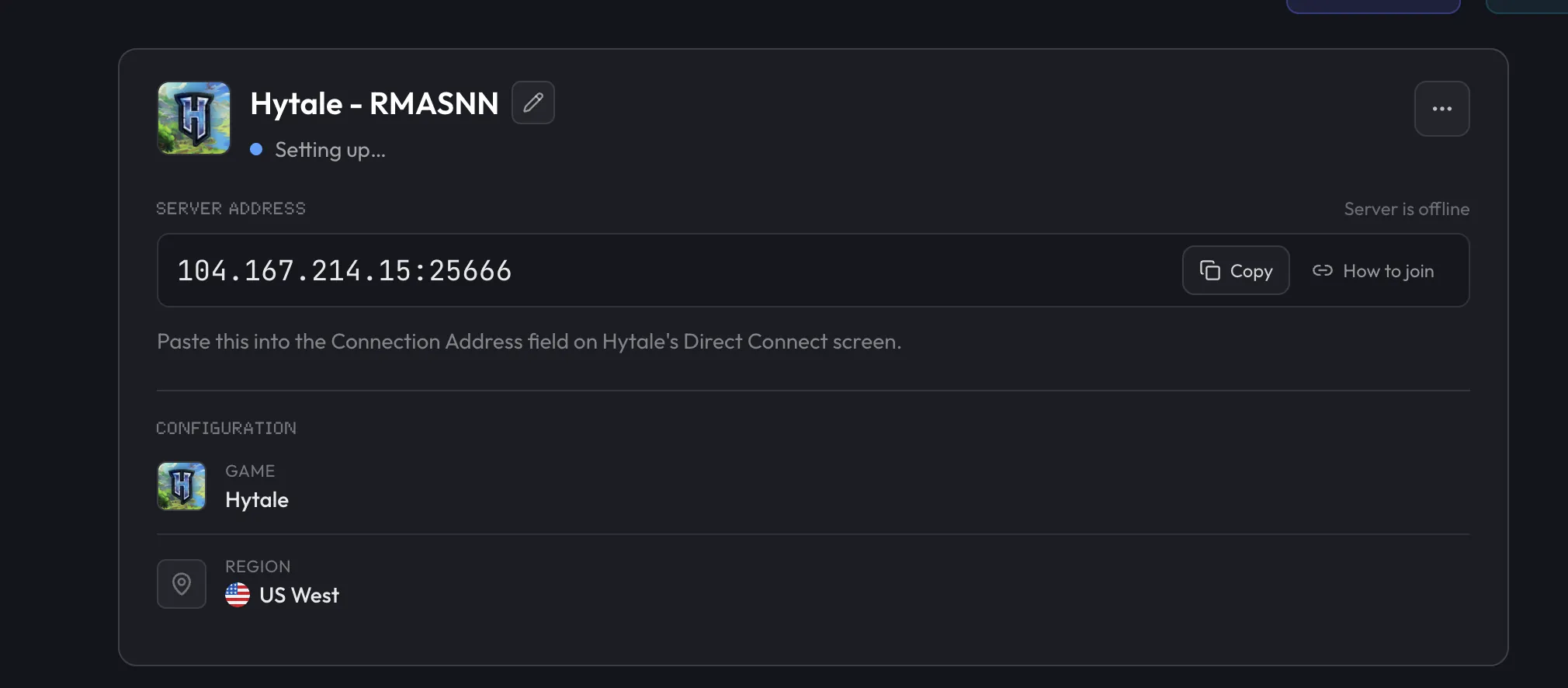
Our server setup guide walks through each step.
Host your Chapter 1 server on berrybyte
Start a Hytale server on berrybyte from $9.95/month, with automatic updates and backups. Already have a world? Mention it when you open a support ticket, and our team will move it to your server for free.