How to fix crashes on a Palworld server
Palworld's memory leaks pin RAM after a few hours and eventually crash the server. Schedule automatic restarts every 3-6 hours, disable raid and non-login penalty settings, and tune spawn and item limits to reduce the load.
Palworld's memory leaks pin more RAM the longer a server runs, eventually causing a crash. Scheduling automatic restarts and tuning a handful of settings reduces how often that happens.
Schedule automatic restarts
Restarting every 3-6 hours before memory climbs too high is the single most effective fix. On berrybyte, set this up under Automations, adding a recurring restart action on whatever interval fits your player activity. Self-hosting instead? A cron job (Linux) or a Windows Task Scheduler entry that stops and relaunches the server process on the same interval does the same job. Shorter intervals mean less time spent laggy before a crash; longer intervals mean fewer interruptions for players currently online.
Pick an interval based on when your server is busiest. A restart during low-activity hours barely gets noticed, while one during peak hours interrupts people mid-session. See Start, stop & restart for how the power controls work if you'd rather restart manually on a routine.
Tune settings to reduce the load
These changes lower how much work the server does per tick, which helps memory grow more slowly between restarts.
| Setting | Change | Effect |
|---|---|---|
bEnableInvaderEnemy | Set to False | Disables raids, removing a source of spawned enemies and load spikes |
bEnableNonLoginPenalty | Set to False | Stops penalties from processing for offline players |
DropItemMaxNum | Lower from 3000 to 1000 | Fewer dropped items on the ground for the server to track |
PalSpawnNumRate | Lower from 1.0 to 0.7 | Fewer Pals spawned and simulated at once |
Change these in
Settings → Game Settings on
berrybyte, or edit PalWorldSettings.ini directly in your file manager or
over FTP if you prefer, or if you're self-hosting.
Adjust the network tickrate
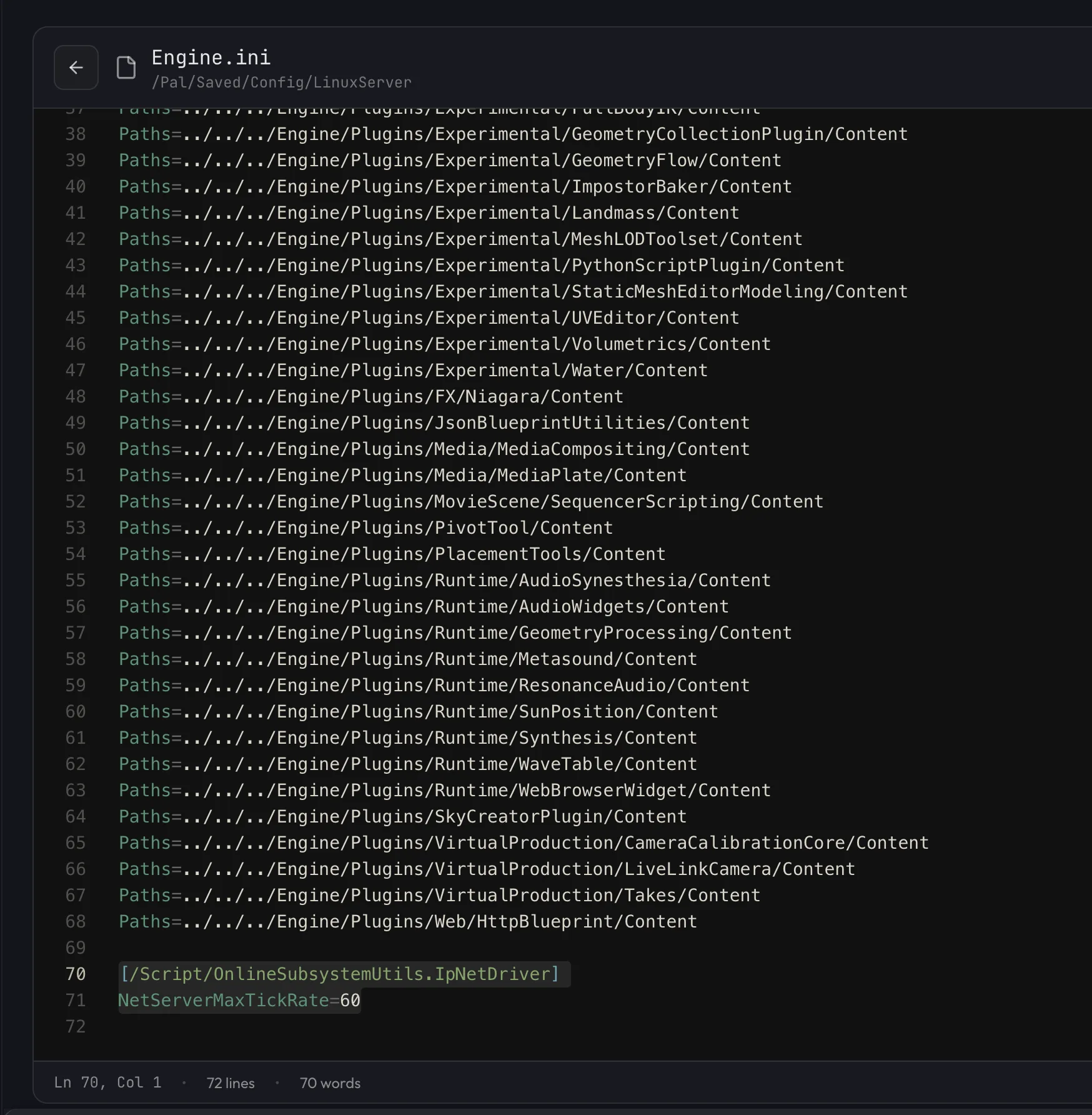
Adding a tickrate line to Engine.ini can smooth out syncing between players
and ease pressure on the server. In your file manager or over FTP/SFTP
(Files on berrybyte), browse to Pal/Saved/Config/LinuxServer/Engine.ini
(WindowsServer instead of LinuxServer on a self-hosted Windows box), and
add this to the bottom:
[/Script/OnlineSubsystemUtils.IpNetDriver]
NetServerMaxTickRate=60
Restart the server after saving so the change takes effect.
Upgrade your plan's RAM
Pocketpair recommends 16-32GB or more of RAM for a stable dedicated server. If you've applied the settings above and are still crashing regularly, especially with several players online at once, moving to a plan with more RAM is often the most direct fix available.
Why does my server keep crashing?
It crashes after a few hours no matter what I do
This is Palworld's memory leak behavior. Scheduled restarts every 3-6 hours through Automations are the standard mitigation, since there's no permanent fix on Palworld's end yet.
It crashed right after I installed a mod
Mods are a separate and common cause of crashes. See install mods for how to isolate a conflicting or corrupted mod.
It crashes more with more players online
More players means more Pals, items, and raids being simulated at once. Lower
DropItemMaxNum and PalSpawnNumRate from the table above, and consider upgrading RAM if
your server regularly runs near capacity.
If nothing above helps and you suspect the install itself is damaged rather than the settings, a reinstall gives you clean game files. On berrybyte, stop the server and open Settings → Danger zone → Reinstall Server; leaving Erase all files before reinstalling unticked reinstalls while keeping your world and configs in place. Keep Create a backup first ticked either way. A full wipe is covered in reset a server.
If crashes continue after working through these steps, open a support ticket with your server linked and roughly when the crashes happen.
Frequently asked questions
Why does my Palworld server crash after a few hours?
Palworld has memory leaks that gradually pin more RAM the longer the server stays up. Once memory runs out, the server crashes. Scheduling automatic restarts every 3-6 hours is the most reliable fix.
How much RAM does a Palworld server need?
Pocketpair recommends 16-32GB or more for a stable Palworld server, especially with several players online. If you're seeing regular crashes on a smaller plan, upgrading RAM is one of the most direct fixes.
What does NetServerMaxTickRate do in Palworld's Engine.ini?
It sets the server's network tickrate. Adding NetServerMaxTickRate=60 under the IpNetDriver section in Engine.ini smooths out sync between players and can reduce the load that leads to instability.
Can mods cause my Palworld server to crash?
Yes. Conflicting or outdated mods are a common cause of crashes separate from Palworld's own memory leaks. See install mods for how to isolate a mod causing instability.