How to set a password on a Palworld server
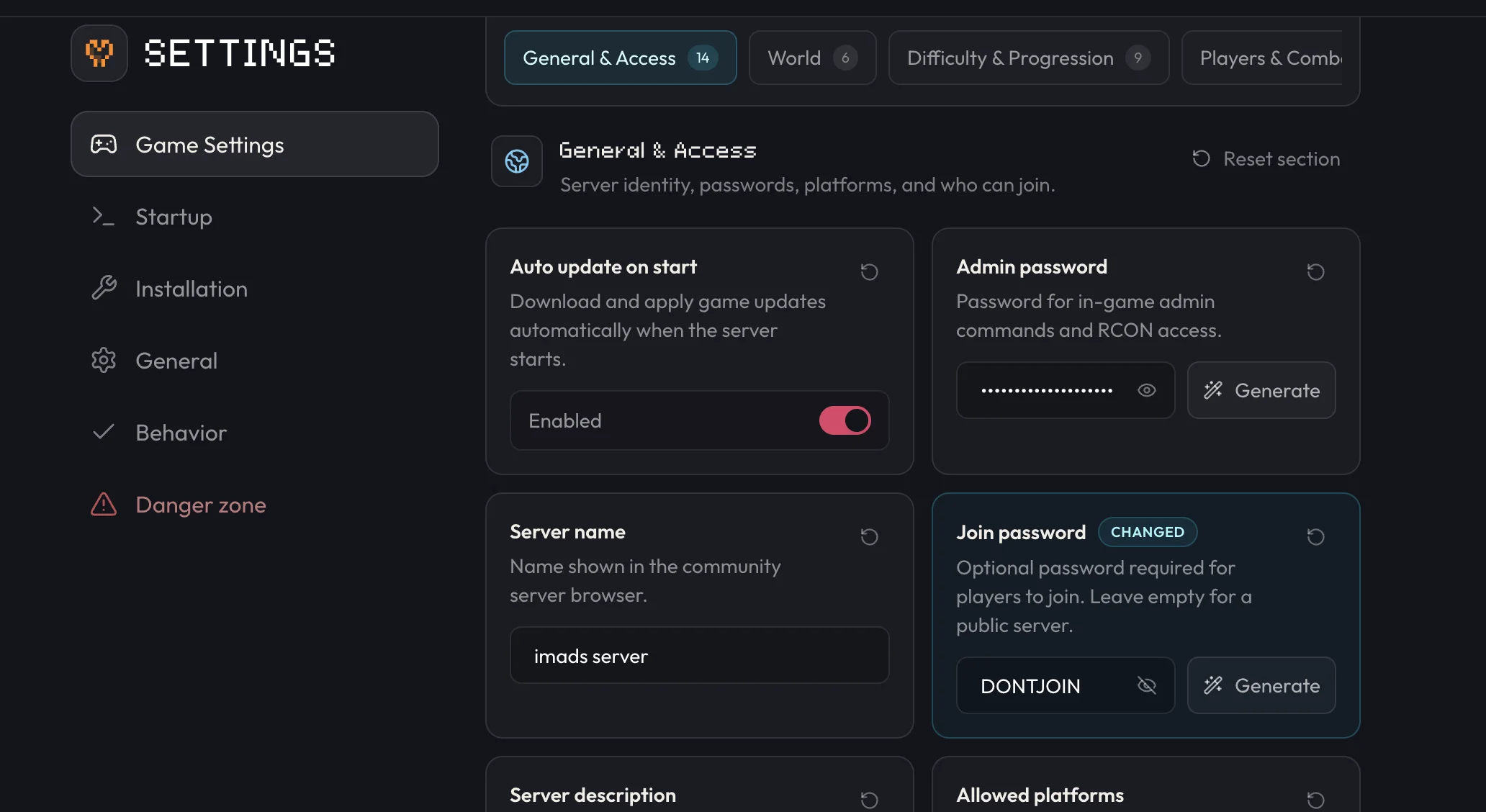
Set ServerPassword in PalWorldSettings.ini, or use your host's settings panel (Settings → Game Settings on berrybyte), then restart the server so every new player has to enter it to join.
A server password stops anyone without it from joining your Palworld server.
Set ServerPassword directly in PalWorldSettings.ini, or through your
host's settings panel, then restart the server so it takes effect. berrybyte
customers can set it from Settings → Game Settings without touching the file.
Change it on berrybyte
Open Settings → Game Settings
Open your server in the dashboard and go to Settings → Game Settings.
Enter a join password
Find Join password and type the password you want players to use.
Restart the server
Restart from the sidebar or Overview. See Start, stop & restart if you need the full rundown of the power controls.
Set it manually on any server
Stop the server
Palworld needs to be offline to reliably pick up a manual config edit.
Open PalWorldSettings.ini
On Linux servers (including berrybyte's), browse to
Pal/Saved/Config/LinuxServer/PalWorldSettings.ini in Files. On a Windows self-host, the
file is at Pal/Saved/Config/WindowsServer/PalWorldSettings.ini instead.
Edit ServerPassword
Set ServerPassword="yourPassword" and save the file.
Start the server
Start the server again from the sidebar or Overview.
Once the server restarts, anyone who tries to join is asked for the password before they can connect. This is separate from admin access: a server password only gates joining, it doesn't grant any in-game permissions. For that, see Become an admin.
A server password is different from Palworld's per-player permission system. Everyone who
knows the password can join and play normally; admin privileges are a separate login handled
by /AdminPassword.
Frequently asked questions
How do I password protect my Palworld server?
Open Settings → Game Settings, enter a password in Join password, and restart the server. Players are prompted for that password the next time they try to join.
Do I need to restart my Palworld server after changing the password?
Yes. The new password only takes effect once the server restarts, so players who are already connected keep playing and new joiners see the prompt after the restart finishes.
Can I set a Palworld server password by editing the config file directly?
Yes. Stop the server, open Pal/Saved/Config/LinuxServer/PalWorldSettings.ini in Files, set ServerPassword="yourPassword", save, and start the server again.