How to become admin on a Palworld server
Become a Palworld admin by setting AdminPassword in PalWorldSettings.ini or your host's settings panel, then typing /AdminPassword yourPassword in the in-game chat every session to unlock admin commands.
Palworld admin access comes from the AdminPassword setting in
PalWorldSettings.ini. Set it there (or through your host's settings panel),
then type /AdminPassword yourPassword into the in-game chat to gain admin
privileges. Palworld does not persist admin sessions, so that command runs
once per login, every time you want admin access. berrybyte customers can set
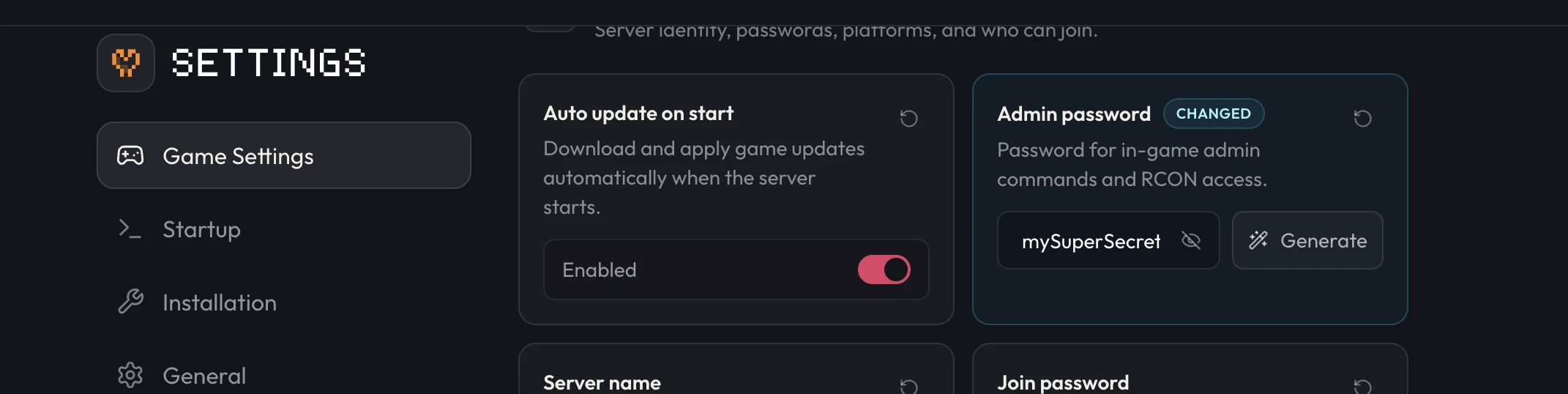
the password from Settings → Game Settings without touching the file directly.
Change it on berrybyte
Stop the server
Open your server in the dashboard and stop it from the sidebar or Overview. Palworld only writes new settings to disk reliably when the server is offline; see Start, stop & restart if you need a refresher.
Open Settings → Game Settings
Find Admin password under Settings → Game Settings. This writes to AdminPassword in
PalWorldSettings.ini.
Enter a secure password
Stick to letters and numbers. Spaces and special characters are the most common reason admin logins fail later, so avoid them even if the field accepts them.
Save and start the server
Save the change, then start the server from the sidebar or Overview. The new password takes effect on this boot.
Set it manually on any server
If you're self-hosting or your host doesn't offer a guided settings panel, you can set the password directly in the config file.
Stop the server
Palworld writes settings to disk reliably only when the server is offline. Editing the file while it's running gets overwritten on the next shutdown.
Open PalWorldSettings.ini
On Linux servers (including berrybyte's), the file lives at
Pal/Saved/Config/LinuxServer/PalWorldSettings.ini. On a Windows self-host, it's at
Pal/Saved/Config/WindowsServer/PalWorldSettings.ini instead. berrybyte customers can reach
this file through Files instead of the guided settings UI, if preferred.
Set AdminPassword
Find AdminPassword="" inside the single OptionSettings line and set it to
AdminPassword="yourPassword", using only letters and numbers.
Save and start the server
Save the file, then start the server so it loads the new password.
Log in as admin in-game
Open the chat
Press Enter while in the world to open the chatbox.
Run the admin command
Type /AdminPassword yourPassword, using the exact password set in AdminPassword, and
press Enter.
Confirm you're logged in
A correct password logs you in as admin for the rest of that session. From here you can run any command from the full admin command list.
Why won't admin commands work?
A few things break this flow, and all of them are easy to check.
| Symptom | Likely cause | Fix |
|---|---|---|
/AdminPassword rejected | Password has spaces or special characters | Set an alphanumeric password and try again |
| Commands still locked after entering the password | Command was mistyped or the login didn't confirm | Re-run /AdminPassword yourPassword and watch for the success message |
| Password resets after a restart | Password was set while the server was still running | Stop the server, set the password, save, then start it |
| Can't find the setting at all | Looking in the wrong place | Check Settings → Game Settings first, then PalWorldSettings.ini in Files if you edited it manually |
If admin login still fails after checking the table above, open a support ticket with your server linked so staff can check the saved config directly.
Frequently asked questions
Why doesn't my admin password work in Palworld?
The password almost always contains a space or special character that Palworld's chat input mishandles. Set a password using only letters and numbers, save it, restart the server, and try /AdminPassword again.
Do I have to log in as admin every time I join a Palworld server?
Yes. Palworld does not remember admin sessions between logins, so you type /AdminPassword yourPassword into the chat each time you want admin privileges, even if you were admin last session.
Why did my Palworld admin password reset after a restart?
The server was likely online when the password was saved. Stop the server first, set Admin password in Settings → Game Settings (or AdminPassword in PalWorldSettings.ini), save, then start the server so the change is written to the config before the server reads it.