How to install mods on a Palworld server
Install a traditional Palworld .pak mod in Pal/Content/Paks, match client-required files on every PC, and restart safely. Palworld 1.0 also has a Windows-only official loader for Workshop packages marked for dedicated servers.
Traditional Palworld .pak mods go in Pal/Content/Paks/ on the server and,
when the mod requires client files, in every player's game install. Upload the
file through your host's file manager or over FTP, match the required clients,
then restart the server to load it.
Palworld 1.0 also has an official Workshop package loader for the Windows
dedicated-server edition. A package is server compatible only when its
Info.json declares an install rule with "IsServer": true. Follow that
package's current instructions instead of putting every Workshop download in
the legacy Paks folder.
Before you start
- You need access to your server's file manager (Files on berrybyte, or FTP/SFTP credentials) to upload anything.
- Confirm the mod supports your server's current Palworld version and install method. An outdated mod is a common source of crashes, covered more in fix server crashes.
- If you have not chosen a mod yet, compare the best Palworld server mods and check whether each one needs client files or a Windows server.
- Every PC player needs the same compatible release of a client-required mod. Consoles cannot install those files. Server-side-only packages are the exception.
Install a mod
Download the mod
Get the .pak file from a site like Nexus Mods or Thunderstore. Check the mod page for your
server's Palworld version before downloading.
Open your server's file manager
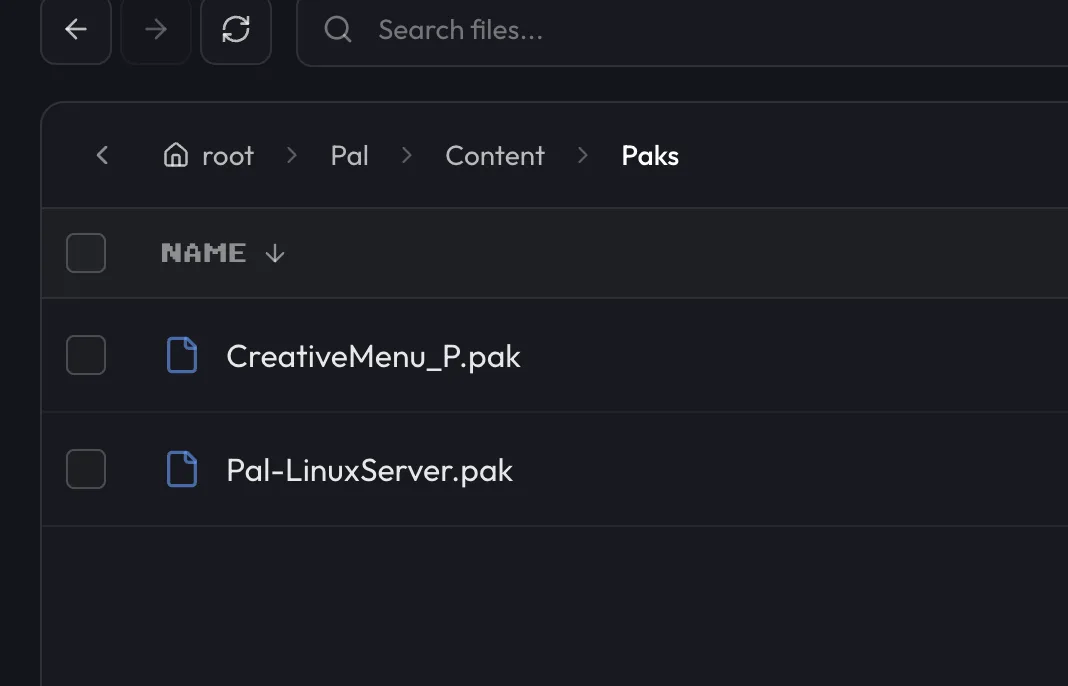
Use your host's file manager, or connect over FTP/SFTP. On berrybyte, open your server in the dashboard and go to Files.
Upload the .pak file
Navigate to Pal/Content/Paks/ and upload the mod's .pak file into that folder.
Add the same file to your own game
On your PC, copy the identical .pak file into your local Palworld install's
Pal/Content/Paks/ folder. Every player who wants to use the mod needs to do this too.
Restart the server
Restart from the sidebar or Overview so the server loads the new mod. See Start, stop & restart if you need the full rundown of the power controls.
Mods can destabilize a server, especially combinations that were never tested together. Keep a backup from before you installed anything, so you can roll back quickly if a mod causes problems.
Mods also change what a save file expects, so after adding or removing them you may want to revisit Settings → Game Settings to check nothing got overwritten.
Why won't my mods load?
Mods aren't loading after installation
The .pak file is usually in the wrong folder or built for a different Palworld version.
Double check it sits directly in Pal/Content/Paks/ and that the mod page lists your server's
current version as supported.
Players can't join the modded server
This is almost always a mismatch between the server's mods and a player's local install. Every
player needs the identical set of .pak files, not just the same mod names.
Server crashes after adding mods
Conflicting mods or a corrupted download are the two most common causes. Remove mods one at a time, restarting between each, until the crashes stop. If a specific file looks suspect, re-download it. For general crash troubleshooting beyond mods, see fix server crashes.
A mod's features aren't showing up in-game
Some mods are client-side only and never do anything on a dedicated server, while others need extra server-side configuration. Check the mod's own documentation for its server requirements before assuming the install failed.
If a mod still won't behave after working through these, open a support ticket with your server linked and the mod name included.
Frequently asked questions
Where do Palworld mods get installed on a server?
Upload the mod's .pak file to the Pal/Content/Paks/ folder in your server's Files tab. The same .pak file also needs to go in your own game's Pal/Content/Paks/ folder on your PC.
Why can't my friends join my modded Palworld server?
For a client-required mod, every PC player needs the exact same compatible files as the server. A mismatch usually blocks that player from joining. Packages explicitly documented as server-side-only are the exception.
Why does my Palworld server crash after installing mods?
Usually a conflict between mods or a corrupted download. Remove mods one at a time to find the culprit, and re-download any file you suspect is broken.
Where do I find safe Palworld mods to download?
Nexus Mods and Thunderstore are the two sites most Palworld mods are hosted on. Check that a mod lists your server's Palworld version as supported before downloading it.