How to join a Palworld server
Steam players join a Palworld dedicated server by IP from Overview or from the in-game server browser. Xbox and PS5 players search the community server list by name. On berrybyte, console listing is already enabled.
Steam players join a Palworld dedicated server by pasting the host:port into Join Multiplayer Game, or by finding it in the in-game server browser. Xbox and PS5 players search the Community Servers list by name — they cannot connect by IP. On berrybyte the Steam address is on Overview, and the community listing is already enabled.
Find your server's address (Steam / PC)
Open Overview
Log in to the dashboard and open your Palworld server's Overview page.
Copy the address
The server's IP address and port are shown below the server name. Click the address to copy it to your clipboard.
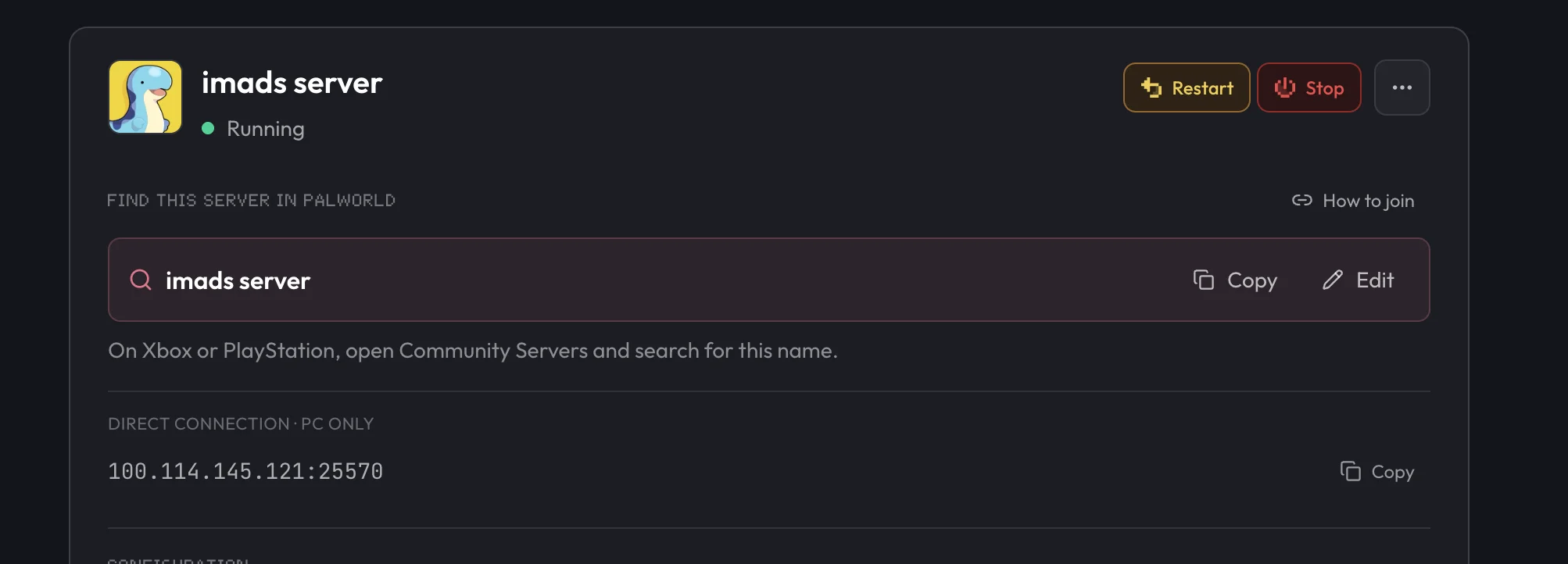
On another host, the address is usually shown on your server's panel or in a confirmation email, the same way it's shown on Overview above. For a self-hosted server, use the machine's public IP address (check a site like whatismyipaddress.com if you don't know it) together with port 8211, Palworld's default game port, unless whoever set up the server changed it.
Connect from Steam
Launch Palworld
Start the game from Steam.
Select Join Multiplayer Game
From the main menu, choose Join Multiplayer Game.
Paste the address or use the browser
Enter the IP address and port you copied into the field at the bottom of the screen, or pick the server from the in-game server browser if it is listed.
Connect
Press Connect. Palworld loads you into the server once the connection succeeds.
Xbox and PS5 players join from the in-game community server list, not by IP. See Join a Palworld server on Xbox.
Connection problems
"Failed to connect to server"
The server is offline or the address is wrong. Check that it's running (Overview on berrybyte, or your host's panel), then copy the address again instead of retyping it by hand.
Connection times out
This usually points to a local network or firewall issue rather than the server itself. Palworld uses port 8211 (UDP) for the game and 27015 for the Steam query. berrybyte opens both automatically; a self-hosted server needs them forwarded manually. Check your own router or firewall if the timeout persists.
Server doesn't appear in the server browser
Steam's browser can take a minute to list a newly started public server. Use the IP from Overview in the meantime. Xbox and PS5 never use that browser — they search Community Servers by name.
Version mismatch error
Your client and the server are on different Palworld versions. Update Palworld through Steam, or check Settings → Game Settings on the server for its current version.
Still stuck after checking the address and your version? Work through Can't connect to a Palworld server in order, then open a support ticket with the server linked so staff can check its status directly. For setup from scratch, see How to set up a Palworld dedicated server.
Frequently asked questions
Why can't I find my Palworld server in the server browser?
Steam can find a public dedicated server in the in-game browser or connect by IP. Xbox and PS5 do not use IP joins — they search Community Servers by name. On berrybyte, Overview has the Steam address and Crossplay plus the community listing are already on.
Why does Palworld say "Failed to connect to server"?
The server is either offline or the address was typed wrong. Check that it's running (Overview on berrybyte, or your host's panel), then copy the address again rather than retyping it.
What ports does a Palworld server use?
8211 (UDP) is the game port and 27015 is the Steam query port. berrybyte opens both automatically; on a self-hosted server you need to forward them yourself.
Why do I get a version mismatch error joining a Palworld server?
Your Palworld client and the server are running different game versions. Update your client through Steam, or check the server's version, on berrybyte that's Settings → Game Settings.
How do I find the IP address of a self-hosted Palworld server?
Use the public IP address of the machine running the server, paired with port 8211 unless it was changed. Check a site like whatismyipaddress.com from that machine if you don't already know it.