How to configure Palworld server settings
Palworld server settings like XP rate, drop rates, and difficulty all live in one OptionSettings line in PalWorldSettings.ini. Edit the file directly while the server is stopped, or use Settings → Game Settings in the berrybyte dashboard.
Palworld server settings, XP rate, drop rates, difficulty, and dozens more,
all live in one OptionSettings line inside PalWorldSettings.ini. Edit
that file directly on any server, self-hosted or otherwise, to reach every
option the game supports. berrybyte customers get a guided shortcut for the
most common changes: Settings → Game Settings writes straight to the same
file.
Build or import a PalWorldSettings.ini for Palworld 1.0.3 with the
Palworld Server Settings Generator.
Share links leave passwords out.
Change settings through the dashboard
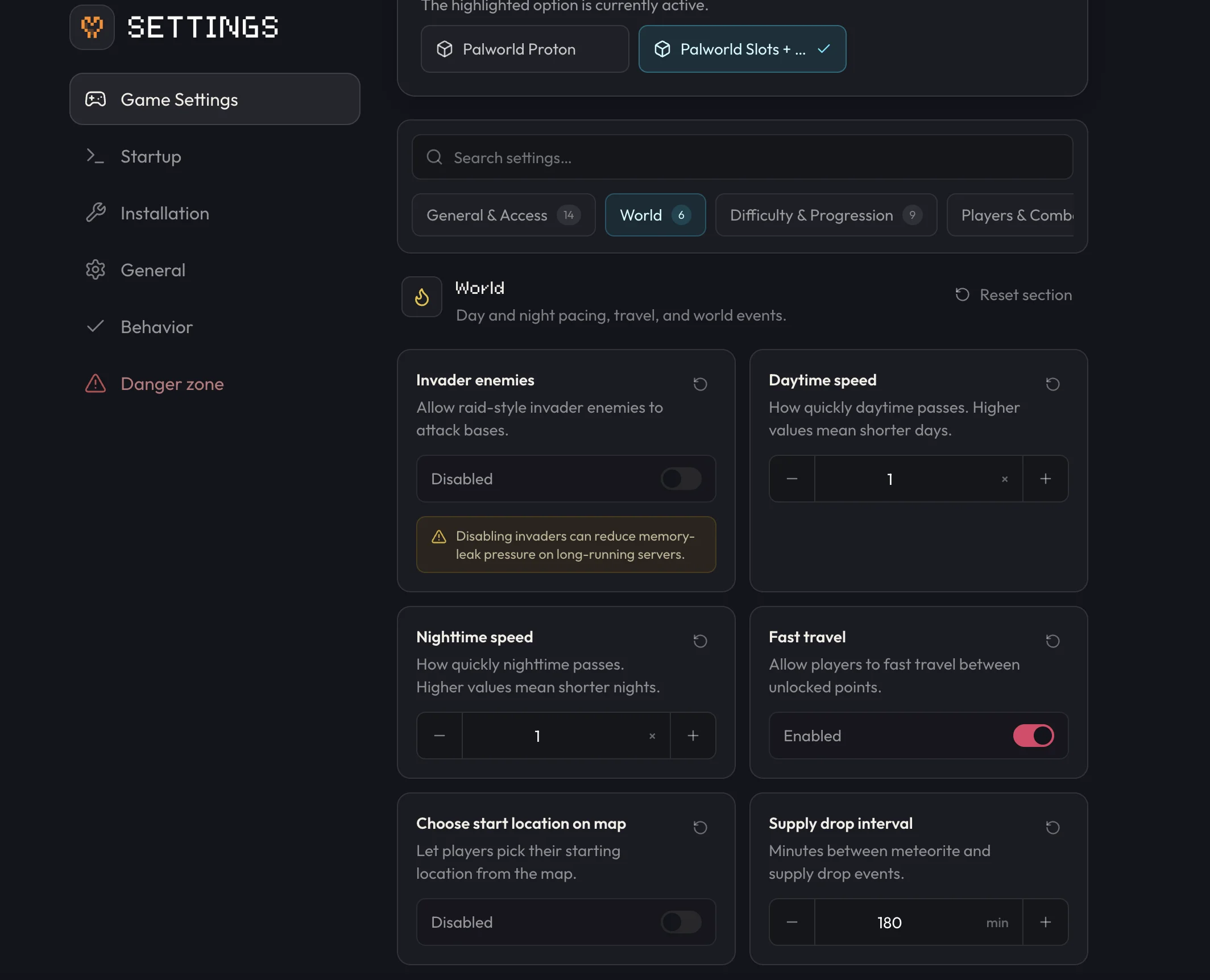
Open Settings → Game Settings
Go to your server in the dashboard and open Settings → Game Settings. This is the guided equivalent of the old Palworld Settings tab.
Find the setting you want
Search or scroll for the option you want to change.
Edit the value
Enter your desired value or toggle the option.
Restart the server
Save your changes, then restart the server from the sidebar or Overview so Palworld picks up the new values. See Start, stop & restart for what each control does.
Commonly changed settings
These are the options players search for most. All of them live in
OptionSettings and are also editable through Settings → Game Settings.
| Setting | What it does | Default |
|---|---|---|
ExpRate | Multiplier for how fast players gain XP | 1.000000 |
PalCaptureRate | Multiplier for how easily Pals are caught | 1.000000 |
PalSpawnNumRate | Multiplier for how many Pals spawn in the world | 1.000000 |
DeathPenalty | What a player drops on death: None, Item, ItemAndEquipment, or All | All |
ServerPlayerMaxNum | Maximum concurrent players on the server | 32 |
DayTimeSpeedRate / NightTimeSpeedRate | Multiplier for how fast day and night pass | 1.000000 |
bIsPvP | Whether players can fight each other | False |
CrossplayPlatforms | Which clients may join: Steam, Xbox, PS5, Mac | (Steam,Xbox,PS5,Mac) |
For deeper dives on specific settings, see Set a server password and Item drop penalty.
For the complete list beyond these, including every combat, breeding, and building rate, see the community-maintained PalWorldSettings.ini reference on palworld.wiki.gg.
Edit PalWorldSettings.ini directly
Stop the server
Palworld only writes the file's current values to disk reliably when the server is offline. Editing while it's running gets overwritten on the next shutdown.
Open the config file
On Linux servers (including berrybyte's), navigate to
Pal/Saved/Config/LinuxServer/PalWorldSettings.ini (in Files on berrybyte). On a
Windows self-host, the same file is at
Pal/Saved/Config/WindowsServer/PalWorldSettings.ini.
Edit and save
Make your changes and save the file.
Start the server
Start the server so it loads the updated file.
Stop the server before editing PalWorldSettings.ini. Changes made while it's running get
overwritten when the server next shuts down.
The entire settings block is one line. Here's what a small change to a few values looks like:
OptionSettings=(Difficulty=None,ExpRate=2.000000,DeathPenalty=Item,ServerPlayerMaxNum=24,ServerName="My Server")This example only shows a few keys for illustration. Your actual file has dozens more on that same line, all inside the same parentheses.
Common issues
Settings reset after a restart
Changes were made while the server was still running. Stop the server before editing
PalWorldSettings.ini, save your changes, then start it.
Configuration file appears empty
The file hasn't been generated yet. Start the server once so Palworld writes its default configuration, then stop it and edit.
Invalid configuration syntax
The file's formatting broke, usually from a stray line break inside OptionSettings. Confirm
every setting sits on the single OptionSettings=(...) line before saving.
Want full admin access to change things in-game instead? See Become an admin. If a setting won't save or the server won't start after an edit, open a support ticket with your server linked.
See every Palworld guide for setup, backups, mods, and Xbox crossplay.
Frequently asked questions
Where are Palworld server settings stored?
In PalWorldSettings.ini, at Pal/Saved/Config/LinuxServer/PalWorldSettings.ini on Linux servers or Pal/Saved/Config/WindowsServer/PalWorldSettings.ini on Windows self-hosts. Every option lives inside one OptionSettings line, formatted as OptionSettings=(Key=Value,Key=Value,...).
Why did my Palworld settings reset after a restart?
The server was likely running when you edited PalWorldSettings.ini. Palworld overwrites the file with its in-memory settings on shutdown, so always stop the server before editing, then start it once your changes are saved.
How do I change the XP rate on my Palworld server?
Open Settings → Game Settings and set Experience rate to a multiplier above 1.0 for faster leveling, such as 2.0 for double XP. You can also edit ExpRate directly in PalWorldSettings.ini while the server is stopped.
Where can I find every Palworld server setting?
The Palworld Server Settings Generator builds or imports PalWorldSettings.ini for Palworld 1.0.3. palworld.wiki.gg lists every key. Settings → Game Settings covers the most common changes.