How to change the item drop penalty on a Palworld server
Palworld's DeathPenalty setting in PalWorldSettings.ini controls what a player loses on death, from None to All (items, equipment, and Pals). Set it in the file directly or through your host's settings panel, then restart the server.
Palworld's DeathPenalty setting decides what a player drops on death, from
nothing at all up to items, equipment, and Pals together. It lives in
PalWorldSettings.ini and can be edited there directly or through your
host's settings panel. Restart the server for the change to apply. berrybyte
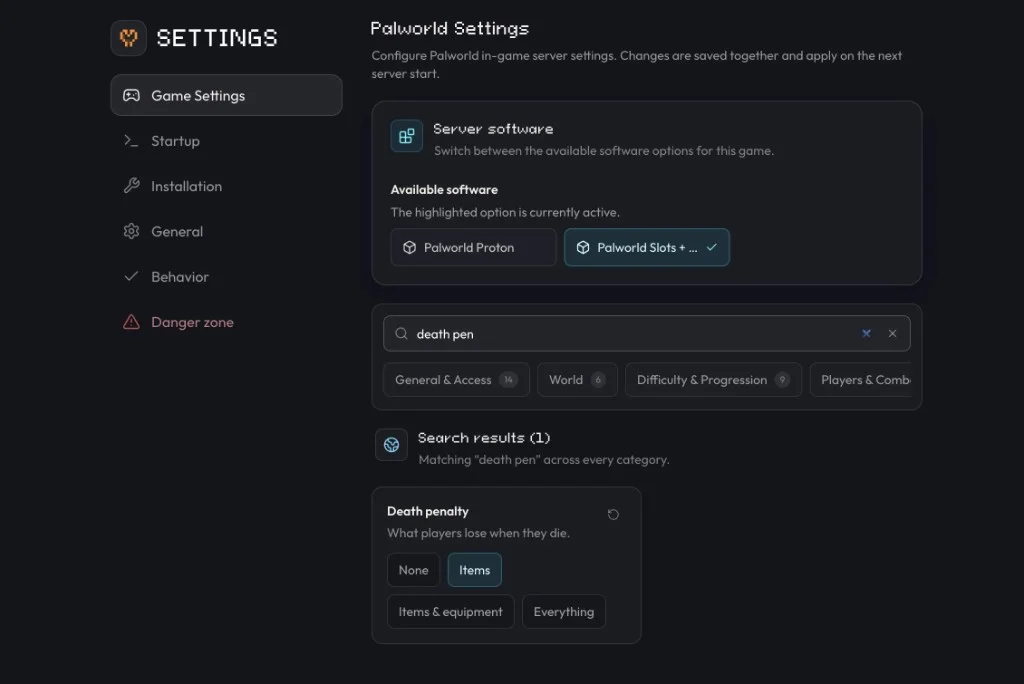
customers can set it from Settings → Game Settings.
Change it on berrybyte
Open Settings → Game Settings
Open your server in the dashboard and go to Settings → Game Settings.
Find Death penalty
Search for death pen or scroll to Death penalty.
Choose a value
Tap one of the four options: None, Items, Items & equipment, or Everything. See the table below for what each one does.
Restart the server
Restart from the sidebar or Overview so the new setting applies; see Start, stop & restart for the full power controls.
Death penalty options
| In Game Settings | In PalWorldSettings.ini | What a player loses on death |
|---|---|---|
| None | None | Nothing. Items, equipment, and Pals all stay with the player. |
| Items | Item | Inventory items only. Equipped gear and Pals stay with the player. |
| Items & equipment | ItemAndEquipment | Inventory items and equipped gear. Pals stay with the player. |
| Everything | All | Items, equipment, and Pals. This is the default. |
All is Palworld's default and the harshest option: a bad death can cost captured Pals along with everything in your inventory and equipment slots. Consider Item or ItemAndEquipment for a more forgiving server, especially for newer players.
Set it manually on any server
Stop the server
Palworld writes settings to disk reliably only when the server is offline.
Open PalWorldSettings.ini
On Linux servers (including berrybyte's), the file is at
Pal/Saved/Config/LinuxServer/PalWorldSettings.ini. On a Windows self-host, it's at
Pal/Saved/Config/WindowsServer/PalWorldSettings.ini instead.
Set DeathPenalty
Inside the single OptionSettings line, set DeathPenalty= to one of None, Item,
ItemAndEquipment, or All, exactly as shown in the table above.
Save and start the server
Save the file, then start the server so it picks up the new value.
DeathPenalty lives alongside every other Palworld setting in
PalWorldSettings.ini (Settings → Game Settings on berrybyte); see
Configure server settings
for the full list of what you can tune there.
Frequently asked questions
What happens when you die in Palworld by default?
By default, Palworld drops everything on death: items, equipment, and captured Pals. On berrybyte, change Death penalty in Settings → Game Settings. You can also edit DeathPenalty in PalWorldSettings.ini.
How do I stop losing my Pals when I die in Palworld?
Change Death penalty to Items or Items & equipment instead of Everything. Both keep your Pals with you after death; only Everything takes them away. In PalWorldSettings.ini those values are Item, ItemAndEquipment, and All.
What's the difference between Items and Items & equipment?
Items drops your inventory but leaves equipped gear on you. Items & equipment drops both your inventory and whatever you have equipped, while still leaving your Pals untouched.