Set up Simple Voice Chat on a Minecraft server
Simple Voice Chat adds proximity voice to Minecraft Java. Install it on the server and on every player's client, open a UDP port (24454 by default), and set port= in voicechat-server.properties. On berrybyte, add the port under Network → Allocations.
Simple Voice Chat adds proximity voice chat to Minecraft Java Edition. Players hear each other when they are close in the world, with optional group calls. Setup takes three parts on any host:
- Install it on the server and on every player's client.
- Open a UDP port for voice. The default is
24454. - Set that port as
port=invoicechat-server.properties, then restart.
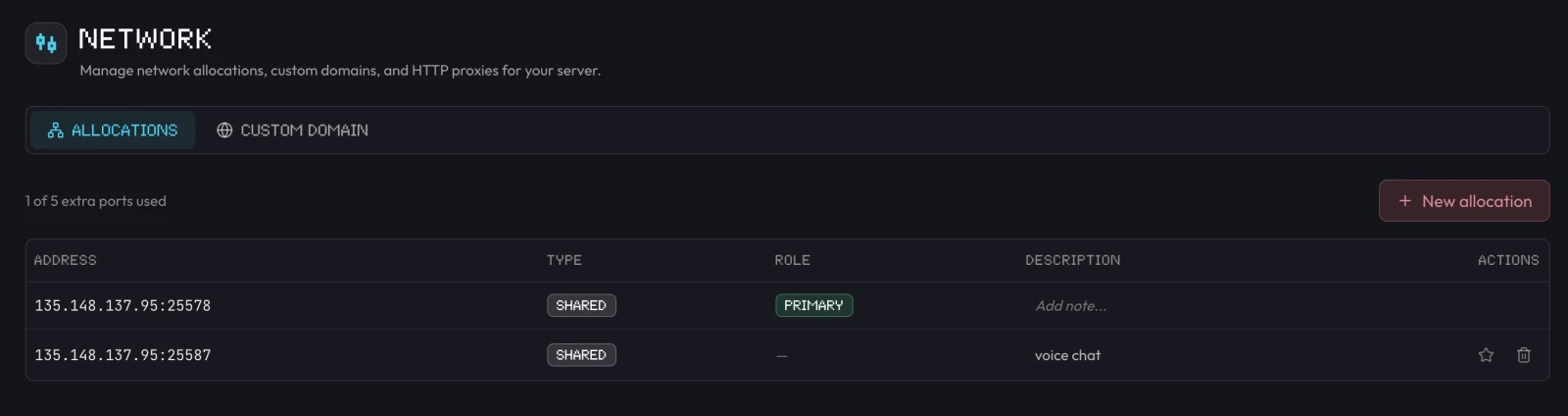
On berrybyte, the UDP port comes from Network → Allocations → New allocation. The steps below cover berrybyte first, then any self-hosted server.
Voice traffic does not use the Minecraft game connection. If players can join but see a crossed-out plug icon, the UDP port is the problem. See Troubleshooting.
What you need
| Server software | Simple Voice Chat build | Server folder |
|---|---|---|
| Paper, Purpur, Spigot, Folia | Bukkit/Paper plugin | plugins/ |
| Fabric or Quilt | Fabric or Quilt mod, plus Fabric API on Fabric | mods/ |
| NeoForge | NeoForge mod | mods/ |
| Forge | Forge mod | mods/ |
| Velocity, BungeeCord, Waterfall | Proxy plugin (see proxies) | plugins/ |
- Vanilla servers cannot run it. Switch to Paper for plugins, or Fabric to stay close to vanilla gameplay.
- Every player needs the client mod for Fabric, NeoForge, Forge, or Quilt. This applies even when the server runs the Paper plugin. Players without it can still join, but they have no voice.
- Match the Minecraft version. Download the build for the exact Minecraft release and loader the server runs. Simple Voice Chat supports releases from 1.8.8 through 1.21.x and the newer 26.x versions.
- Java Edition only. Bedrock players who join through Geyser cannot use voice chat.
1. Install Simple Voice Chat on the server
Download the jar from Modrinth or CurseForge. Filter by your Minecraft version and loader before you download.
Stop the server
Stop it before adding plugins so the jar loads cleanly on the next start.
Upload the plugin jar
On berrybyte, open Overview → Plugins → Manage plugins. This opens
Files at plugins/. Click Upload and choose the
voicechat-bukkit jar. On any other host, copy it into the server's
plugins/ folder.
Start once to create the config
Start the server, wait for it to finish loading, then stop it. This
creates plugins/voicechat/voicechat-server.properties.
Stop the server
Mods only load at startup.
Upload the mod jar
On berrybyte, open Files → mods/, click Upload, and choose the
jar for your loader. On Fabric, also upload
Fabric API if mods/ does not
already have it.
Start once to create the config
Start the server, wait for it to finish loading, then stop it. This
creates config/voicechat/voicechat-server.properties.
Check whether the pack already includes it
Many modpacks ship Simple Voice Chat. Look in Files → mods/ for a
voicechat- jar. If it is there, skip the upload and go to step 2.
Add it if it is missing
Upload the jar for the pack's loader and Minecraft version to mods/.
Every player must then add the same mod to their copy of the pack.
Start once to create the config
Start and stop the server so
config/voicechat/voicechat-server.properties exists.
2. Open a UDP port for voice
Simple Voice Chat listens on its own UDP port. It needs a port players can reach that nothing else on the server is using.
Open Network → Allocations
The PRIMARY row is your Minecraft game address. Leave it alone.
Click New allocation
On a standard server, the new port appears right away. If your server has a dedicated IP, pick that same IP in the dialog so voice uses the address players already join.
Note the new port
The Address column shows it as IP:port. The number after the
colon is your voice chat port. Add a description like "Voice chat" so
you remember what it is for.
Every berrybyte allocation is open for both TCP and UDP, so no firewall changes are needed. If New allocation says the extra port limit is reached, contact support.
Keep the default 24454, or pick any free port. Then allow it as
UDP, not TCP:
sudo ufw allow 24454/udpsudo firewall-cmd --permanent --add-port=24454/udp
sudo firewall-cmd --reloadNew-NetFirewallRule -DisplayName "Simple Voice Chat" -Direction Inbound -Protocol UDP -LocalPort 24454 -Action Allow- Home network: forward UDP 24454 on your router to the server PC's local IP. If your ISP uses CGNAT, a router forward cannot work. Use a host or a tunnel with UDP support instead.
- Docker (for example
itzg/minecraft-server): publish it as UDP with-p 24454:24454/udp. A TCP-only mapping does not carry voice. - Pterodactyl or another panel: assign the server an extra allocation and use its port.
- Tunnels such as playit.gg: create a UDP tunnel, use its port,
and set
voice_hostto the tunnel address.
3. Set the port in voicechat-server.properties
With the server stopped, open the config file:
- Paper, Purpur, Spigot:
plugins/voicechat/voicechat-server.properties - Fabric, Quilt, NeoForge, Forge:
config/voicechat/voicechat-server.properties
On berrybyte, open it from Files and edit it in the browser. Change
port= to the port from step 2:
# The UDP port from step 2 (default 24454)
port=25587
# Leave these empty unless you use a proxy or tunnel
bind_address=
voice_host=
Save the file, then start the server. The server only reads this file at startup, so edits made while it runs do not apply until a restart.
Do not use port=-1. It reuses the Minecraft server port, which the
developers advise against. Minecraft's query.port often shares that UDP
port, and the clash can crash the server. On berrybyte, query.port is
always the game port.
4. Check that voice chat started
Open Console while the server boots. Look for a line that begins with:
Voice chat server started atThe port it prints must match the one you set. If you see Address already in use, something else is on that port. If you see Failed to bind to address,
clear bind_address. Then restart.
When a player connects with the mod, the console also logs Player <name> (<uuid>) successfully connected to voice chat. That line means voice works for
that player.
5. Set up voice chat as a player
Install the client mod
Add Simple Voice Chat for your loader (Fabric, NeoForge, Forge, or Quilt) and the server's Minecraft version to your launcher profile. On a modpack, use the pack's own profile.
Join and press V
The first time, a chat message asks you to set up voice chat. Press V to open the setup guide.
Pick your devices and mode
Choose a microphone and a speaker, then Push to talk or Voice activation. Push to talk has no default key, so bind one in the guide. If you choose voice activation, the guide starts you muted. Press M to unmute.
Test it
Use Enable microphone testing in the voice chat settings to hear
yourself. An operator can also run /voicechat test <player> in-game to
check someone's connection.
On macOS, Minecraft never asks for microphone access by itself. Launch through Prism Launcher or GDLauncher, or set the CurseForge app to use its own launcher, so macOS shows the microphone prompt.
Default keys
| Key | Action |
|---|---|
V | Open voice chat menu |
M | Mute microphone |
N | Turn voice chat off |
H | Hide voice chat icons |
G | Group chats on 1.21.5 and older (unbound on 1.21.6+) |
| — | Push to talk and whisper are unbound by default |
Change them in Options → Controls → Key Binds under Voice Chat.
Useful server settings
All of these live in voicechat-server.properties. Restart after any change.
| Setting | Default | What it does |
|---|---|---|
port | 24454 | UDP port voice chat listens on |
max_voice_distance | 48 | How far, in blocks, normal speech carries |
whisper_distance | 24 | How far whispering carries |
enable_groups | true | Allows group calls that ignore distance |
force_voice_chat | false | Kicks players who do not have the mod installed |
login_timeout | 10000 | Milliseconds to wait for the mod check when force_voice_chat is on |
allow_recording | true | Lets players record voice chat audio |
codec | VOIP | Opus mode: VOIP, AUDIO, or RESTRICTED_LOWDELAY |
bind_address | empty | IP to listen on. Empty uses server-ip from server.properties |
voice_host | empty | Address clients connect to. Only for proxies and tunnels |
Full reference: server config.
Groups and commands
Players run these in-game. They do not work from the server console.
| Command | What it does |
|---|---|
/voicechat invite <player> | Invite a player to your current group |
/voicechat join <group> | Join a group by name |
/voicechat leave | Leave your group |
/voicechat test <player> | Check a player's connection (operators) |
/voicechat help | List all commands |
On Paper, permission plugins such as LuckPerms can control
voicechat.speak, voicechat.listen, and voicechat.groups (everyone by
default) and voicechat.admin (operators by default). See
ops and whitelist to make someone
an operator.
Behind a Velocity or BungeeCord proxy
Install Simple Voice Chat on every backend server, then add the Simple
Voice Chat proxy plugin to the proxy's plugins/ folder. The proxy forwards
voice to each backend, so players only need one UDP port on the proxy. By
default, that is the proxy's own Minecraft port. With the proxy plugin
installed, the backends ignore their voice_host setting.
Backends on the same machine still need different voice ports from each other.
Without the proxy plugin, open each backend's voice port publicly and set
voice_host on each backend to that server's public IP. Details:
proxy setup.
Troubleshooting
Crossed-out plug icon: voice chat not connected
The game connection works, but UDP voice packets are not getting through. Check in this order:
- The console shows
Voice chat server started atwith the port you set. - That port is the one you opened: your berrybyte allocation, firewall rule, or router forward, as UDP.
- You restarted the server after saving the config.
voice_hostis empty, unless you use a proxy or tunnel.- The player is not on a VPN, mobile hotspot, or school or work network that blocks UDP. If the player fails on every voice chat server, the network is the cause.
Address already in use
Another program already holds the voice port. Common causes are a second
server on the same port, query.port in server.properties set to the
voice port, or Geyser listening on it. Give voice chat a port nobody else
uses.
Failed to bind to address
bind_address is set to an IP the machine does not have. Leave it empty.
Players can't hear me, or I can't hear anyone
Press V and check the microphone and speaker are the right devices.
Unmute with M, because voice activation starts muted. Try Enable
microphone testing. Also check your operating system lets the launcher
use the microphone. If people sound like they are right next to you from
far away, you are in a group. Leave it with /voicechat leave.
The mod requires fabric, which is missing
The Fabric build needs Fabric API. Upload the version of
Fabric API that matches your
Minecraft release to mods/, on the server and in the player's
profile.
My config file is empty on Forge
From mod version 2.4.0, Forge moved the config to
config/voicechat/voicechat-server.properties. The old file is emptied
after its settings move over. Edit the new one.
Still stuck on joining at all? Start with Can't connect to a Minecraft server, because voice chat only connects after the game does. Before adding more plugins, take a backup.
Frequently asked questions
What port does Simple Voice Chat use?
UDP 24454 by default. You set it with port= in voicechat-server.properties. It is a separate port from Minecraft's TCP game port, and it has to be reachable over UDP, so open it in the firewall, router, or hosting panel.
Do players need to install Simple Voice Chat?
Yes. Every player who wants voice installs the client mod for Fabric, NeoForge, Forge, or Quilt, even when the server runs the Paper plugin. Players without it can still join, but they cannot talk or hear anyone.
Why does Simple Voice Chat say voice chat not connected?
The client reached the Minecraft server but its UDP voice packets did not get through. Usually the port in voicechat-server.properties does not match the open UDP port, the server was not restarted after the edit, or the network blocks UDP. VPNs and mobile hotspots often do.
Can Simple Voice Chat use the same port as the Minecraft server?
Setting port=-1 reuses the Minecraft server port, but the developers advise against it. Minecraft's query listener often uses that same UDP port, and sharing it can crash the server. Give voice chat its own port.
Does Simple Voice Chat work with Bedrock players through Geyser?
No. Voice chat needs the Java client mod, which Bedrock clients cannot install. Bedrock players can still join and play through Geyser, just without voice.
Does Simple Voice Chat work with a custom domain or SRV record?
Yes. The client sends voice to the IP address it actually connected to, so a domain or SRV record works with no extra settings. Only set voice_host when a proxy or tunnel sits between players and the server.
How do I make players hear each other from further away?
Raise max_voice_distance in voicechat-server.properties. The default is 48 blocks, and whispering uses whisper_distance, 24 blocks by default. Restart the server after saving.